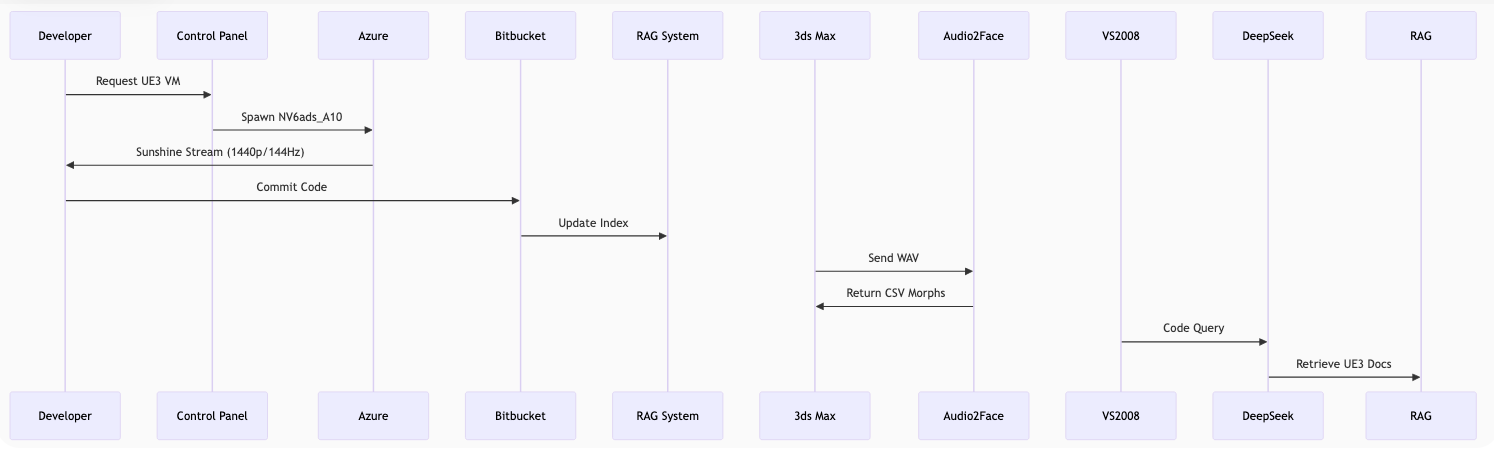
Unreal Engine 3 Remote Development Setup Install Guide
Complete cloud-based UE3 development environment with AI assistance for under $130/month (4hrs/day
usage)
System Architecture Diagram
Data Flow:
Client Devices connect via Moonlight streaming protocol
Scaleway Control Plane manages Jira/Bitbucket and RAG knowledge base
Azure GPU Workstation runs full UE3 development environment
Vast.ai GPU Cluster provides AI services (DeepSeek-LLM and Audio2Face)
All components communicate via encrypted channels
Color Key:
■ Client Interfaces
■ Control Services
■ Development Environment
■ AI Processing
Cloud-Based Unreal Engine 3 Development Environment
A cloud-based Unreal Engine 3 (UE3) remote development environment with AI-assisted tools. It combines cost
efficiency, automation, and modern cloud technologies to create a budget-friendly yet powerful game
development
platform. Here's my breakdown and thoughts:
Performance Considerations: While this single-machine setup is cost-effective, monitor resource
usage closely. For teams larger than 5-10 developers, consider upgrading to a more powerful Scaleway instance
(like DEV1-L at €39.99/month with SSD storage).
Maintenance and Monitoring
# Check running containers
    docker ps

    # View logs for a service
    docker logs <container_name>

    # Check resource usage
    sudo apt install htop
    htop

    # Backup PostgreSQL database
    docker exec -it postgres pg_dumpall -U atlassian > /backups/postgres_backup_$(date +%Y-%m-%d).sql

    # Set up automatic backups (add to crontab)
    0 2 * * * docker exec postgres pg_dumpall -U atlassian > /backups/postgres_backup_$(date +\%Y-\%m-\%d).sql
    0 3 * * * tar -czvf /backups/bitbucket_$(date +\%Y-\%m-\%d).tar.gz /opt/atlassian/bitbucket
    0 4 * * * tar -czvf /backups/jira_$(date +\%Y-\%m-\%d).tar.gz /opt/atlassian/jira
Troubleshooting
Port conflicts: Ensure no other services are using ports 7990, 7999, 8080, 5432, or 8051
Disk space: Monitor HDD usage, especially with Git LFS repositories
Memory issues: Configure JVM options for Bitbucket/Jira if needed (in their respective
config files)
Database connections: Increase max_connections in PostgreSQL if needed
Next Steps
Complete the web-based setup for Bitbucket and Jira
Configure the Jira-Bitbucket integration
Set up your first Unreal Engine project repository
Import existing projects or start new ones
Train your team on using the RAG integration for code search
UnrealScript Code Analysis Pipeline using Crawl4AI RAG MCP Server
Overview
This guide walks you through creating an automated system to process UnrealScript files, analyze them with a
Large Language Model (LLM), and store enriched results in a vector database using the mcp-crawl4ai-rag MCP
server. This will allow rapid AI-assisted retrieval through a Retrieval-Augmented Generation (RAG) pipeline.
1. Parse UnrealScript Files
Use Python to extract UnrealScript functions and metadata from source files:
import re
            import os
            import json

            def extract_uscript_data(file_path):
                with open(file_path, 'r') as f:
                    code = f.read()

                functions = re.findall(r'function\s+(\w+)\s*\(([^)]*)\)', code)
                parsed_functions = []

                for name, params in functions:
                    parsed_functions.append({
                        "function_name": name,
                        "parameters": params.strip()
                    })

                return parsed_functions

            all_functions = []
            for root, dirs, files in os.walk("path/to/uscript"):
                for file in files:
                    if file.endswith(".uc"):
                        path = os.path.join(root, file)
                        all_functions.extend(extract_uscript_data(path))

            with open("uscript_data.json", "w") as f:
                json.dump(all_functions, f, indent=2)
2. Enrich Function Data with an LLM
Use an LLM (e.g. GPT-4) to generate explanations, comments, or modernizations of UnrealScript
functions.
# Example enrichment prompt
            prompt = f"Explain this UnrealScript function:\n\nfunction {name}({params})"
            response = openai.ChatCompletion.create(...)  # Fetch LLM output
Store the enriched data separately or merge with your original function data for advanced semantic
search
later.
3. Format for Ingestion
Convert function objects to markdown or text documents for ingestion by the RAG pipeline.
### Function: Jump
            **Parameters**: float Velocity
            **Description**: Makes the player character jump with a given velocity.
Save each function as its own `.md` file or group related ones into sections.
4. Set Up Supabase Database
Go to your Supabase dashboard and create a project
Open the SQL Editor and run the contents of crawled_pages.sql from the repo
Enable the pgvector extension
5. Install and Run MCP Server
Using Docker (Recommended):
git clone https://github.com/coleam00/mcp-crawl4ai-rag.git
            cd mcp-crawl4ai-rag
            docker build -t mcp/crawl4ai-rag --build-arg PORT=8051 .
            docker run --env-file .env -p 8051:8051 mcp/crawl4ai-rag
smart_crawl_url: to crawl a local server or hosted doc site
Or build a new ingestion tool to feed your enriched UnrealScript content directly.
7. Query the RAG System
Use the RAG endpoint (perform_rag_query) to search your indexed UnrealScript database semantically.
curl -X POST http://localhost:8051/tool/perform_rag_query \
              -H "Content-Type: application/json" \
              -d '{"query": "How does the Jump function work?"}'
8. Ingest External Knowledge Sources
Extend your knowledge base with PDF books, CHM files, and YouTube tutorial transcripts.
8.1 PDF Books
pip install pymupdf

            import fitz  # PyMuPDF
            from pathlib import Path

            def extract_pdf_text(pdf_path):
                doc = fitz.open(pdf_path)
                return "\n\n".join(page.get_text() for page in doc)

            for path in Path("books/").glob("*.pdf"):
                text = extract_pdf_text(path)
                with open(f"markdown/{path.stem}.md", "w") as f:
                    f.write(f"# {path.stem}\n\n{text}")
8.2 CHM Files
pip install chmtools

            from chmtools.chm import CHMFile

            chm = CHMFile.open("help.chm")
            for topic in chm.topics():
                with open(f"markdown/{topic.title[:50]}.md", "w") as f:
                    f.write(f"# {topic.title}\n\n{topic.plain_text}")
8.3 YouTube Transcripts
pip install youtube-transcript-api

            from youtube_transcript_api import YouTubeTranscriptApi

            video_id = "abc123"
            transcript = YouTubeTranscriptApi.get_transcript(video_id)

            text = "\n".join([x["text"] for x in transcript])
            with open(f"markdown/{video_id}.md", "w") as f:
                f.write(f"# Transcript for {video_id}\n\n{text}")
9. Connect to Jira and Bitbucket for Project Knowledge
Integrate your pipeline with Jira and Bitbucket to ingest tickets, commit logs, and code reviews for
richer project context.
BITBUCKET_USER = "your-username"
            REPO_SLUG = "your-repo"
            TOKEN = "your-app-password"

            resp = requests.get(
                f"https://api.bitbucket.org/2.0/repositories/{BITBUCKET_USER}/{REPO_SLUG}/commits",
                auth=(BITBUCKET_USER, TOKEN)
            )

            for commit in resp.json()["values"]:
                hash = commit["hash"]
                message = commit["message"]
                with open(f"markdown/commit_{hash[:7]}.md", "w") as f:
                    f.write(f"# Commit {hash[:7]}\n\n{message}")
Reflections and Suggestions
This pipeline stands out for its modularity, real-world utility, and seamless integration of modern AI tools
with
legacy codebases. It effectively combines:
✅ Practical focus for UnrealScript legacy modernization
Suggestions to Consider
📌 Add a visual diagram: Include a simple flowchart or architecture diagram
📌 Document metadata enrichment: Enhance your Markdown documents with metadata
📌 Security note: Clearly separate and secure your API keys
🧩 Crawl4AI RAG Integration
The Crawl4AI RAG pipeline allows you to index and retrieve enriched UnrealScript data for AI-assisted
queries. It
seamlessly integrates various sources of knowledge into a vector database.
Key features:
Semantic Querying: The perform_rag_query() function provides AI-driven responses
Data Storage: Indexed data stored in Supabase-compatible PostgreSQL database
Vector Search: OpenAI or Ollama-based vector search for knowledge retrieval
Frontend user interface for managing virtual machines and quotas:
Welcome Page /welcome
Overview of the platform with CTAs to register or log in.
Login /login
User login (email/password or Azure authentication).
Dashboard /dashboard
Overview of system status (connected Azure account, quotas, VM status).
Quota Management /quota
Manage quotas for NVA10 instances (initially 0).
Request Quota/request-quota
Request an increase in NVA10 quota via an API call.
Virtual Images /images
List of available pre-configured virtual images for game development.
Clone VM/clone-vm
Users can select an image to create a new VM.
VM Management /vms
List of running/destroyed VMs with details (VM ID, status, creation time, end time).
Create VM/create-vm
Start the process to create a new VM using a selected image.
View VM/view-vm
View detailed information for each VM.
Manage VM/manage-vm
Options to restart, destroy, or edit VM settings.
Email Notifications /notifications
System notifications for VM creation or destruction via email.
Azure Connection /azure
Connect your Azure account after login.
Connection Status/azure-status
Displays if the Azure account is connected.
Logout /logout
Log out of the platform.
API Endpoints Documentation
1. VM Management
POST   api.platform.app/vm/create_rtx
    POST   api.platform.app/vm/create_rtx_azure
    GET    api.platform.app/vm/create_rtx_azure_progress
    POST   api.platform.app/vm/destroy_rtx_azure
    GET    api.platform.app/vm/auto_check_rtx_status
    GET    api.platform.app/vm/check_rtx_status
    POST   api.platform.app/vm/clone_rtx_azure_vm
    POST   api.platform.app/vm/clone_rtx_azure_vm_delete
2. System Health & Monitoring
GET    api.platform.app/system/health
    GET    api.platform.app/system/resource-utilization
    GET    api.platform.app/system/alerts
    GET    api.platform.app/system/reports
Email API
1. Send Email
POST   api.platform.app/sns/forgetpass
    POST   api.platform.app/sns/verifyemail
    POST   api.platform.app/sns/welcome
    POST   api.platform.app/sns/passwordreset
    POST   api.platform.app/sns/subscriptionconfirmation
    POST   api.platform.app/sns/invoice
    POST   api.platform.app/sns/paymentconfirmation
    POST   api.platform.app/sns/transactionalert
    POST   api.platform.app/sns/deactivationnotice
    POST   api.platform.app/sns/activationnotice
    POST   api.platform.app/sns/vmready
    POST   api.platform.app/sns/vmdestroyed
    POST   api.platform.app/sns/weeklynews
2. Email Templates
GET    api.platform.app/sns/templates/list
    POST   api.platform.app/sns/templates/create
    PUT    api.platform.app/sns/templates/edit/{template_id}
    DELETE api.platform.app/sns/templates/delete/{template_id}
3. Email Queue Management
GET    api.platform.app/sns/queue/status
    POST   api.platform.app/sns/queue/clear
    POST   api.platform.app/sns/queue/resend/{email_id}
    API Endpoints
    1. VM Management
        POST   api.platform.app/vm/create_rtx
        POST   api.platform.app/vm/create_rtx_azure
        GET    api.platform.app/vm/create_rtx_azure_progress
        POST   api.platform.app/vm/destroy_rtx_azure
        GET    api.platform.app/vm/auto_check_rtx_status
        GET    api.platform.app/vm/check_rtx_status
        POST   api.platform.app/vm/clone_rtx_azure_vm
        POST   api.platform.app/vm/clone_rtx_azure_vm_delete

    2. System Health & Monitoring
        GET    api.platform.app/system/health
        GET    api.platform.app/system/resource-utilization
        GET    api.platform.app/system/alerts
        GET    api.platform.app/system/reports

    Email API
    1. Send Email
        POST   api.platform.app/sns/forgetpass
        POST   api.platform.app/sns/verifyemail
        POST   api.platform.app/sns/welcome
        POST   api.platform.app/sns/passwordreset
        POST   api.platform.app/sns/subscriptionconfirmation
        POST   api.platform.app/sns/invoice
        POST   api.platform.app/sns/paymentconfirmation
        POST   api.platform.app/sns/transactionalert
        POST   api.platform.app/sns/deactivationnotice
        POST   api.platform.app/sns/activationnotice
        POST   api.platform.app/sns/vmready
        POST   api.platform.app/sns/vmdestroyed
        POST   api.platform.app/sns/weeklynews

    2. Email Templates
        GET    api.platform.app/sns/templates/list
        POST   api.platform.app/sns/templates/create
        PUT    api.platform.app/sns/templates/edit/{template_id}
        DELETE api.platform.app/sns/templates/delete/{template_id}

    3. Email Queue Management
        GET    api.platform.app/sns/queue/status
        POST   api.platform.app/sns/queue/clear
        POST   api.platform.app/sns/queue/resend/{email_id}
    -- 1. Users Table
    CREATE TABLE users (
        user_id CHAR(36) PRIMARY KEY,               -- UUID for unique identification (stored as a CHAR(36) for simplicity)
        email VARCHAR(255) NOT NULL,                -- User's email address, set to not null
        role ENUM('admin') NOT NULL,                -- Enum for user role (only admin)
        password_hash VARCHAR(255),                 -- Hashed password (for authentication)
        azure_account_connected BOOLEAN DEFAULT FALSE, -- Track if the Azure account is connected
        created_at TIMESTAMP DEFAULT CURRENT_TIMESTAMP, -- Automatically set to the current timestamp
        updated_at TIMESTAMP DEFAULT CURRENT_TIMESTAMP ON UPDATE CURRENT_TIMESTAMP -- Automatically updates whenever the record is modified
    );

    -- 2. VM Instances Table
    CREATE TABLE vm_instances (
        vm_id CHAR(36) PRIMARY KEY,                 -- UUID for unique identification (stored as CHAR(36))
        user_id CHAR(36),                           -- Foreign key linking to the admin user
        vm_ip VARCHAR(15) NOT NULL,                 -- IP address of the VM
        vm_username VARCHAR(100) NOT NULL,          -- Username for accessing the VM
        vm_password VARCHAR(100) NOT NULL,          -- Password for accessing the VM
        vm_status ENUM('pending', 'running', 'destroyed') NOT NULL, -- Status of the VM (can be one of 'pending', 'running', 'destroyed')
        created_at TIMESTAMP DEFAULT CURRENT_TIMESTAMP, -- When the VM was created
        destroyed_at TIMESTAMP,                     -- When the VM was destroyed (nullable)
        last_updated TIMESTAMP DEFAULT CURRENT_TIMESTAMP ON UPDATE CURRENT_TIMESTAMP, -- When the VM status was last updated
        FOREIGN KEY (user_id) REFERENCES users(user_id) ON DELETE CASCADE -- Link to the `users` table; cascade delete if the user is removed
    );

    -- 3. Snapshots/Images Table
    CREATE TABLE snapshots (
        snapshot_id CHAR(36) PRIMARY KEY,          -- UUID for unique identification (stored as CHAR(36))
        image_id VARCHAR(100),                     -- Azure Image ID associated with the snapshot
        image_status ENUM('pending', 'available') NOT NULL, -- Status of the image (can be 'pending' or 'available')
        snapshot_url VARCHAR(255),                 -- URL to the snapshot (if exported as VHD)
        created_at TIMESTAMP DEFAULT CURRENT_TIMESTAMP -- When the snapshot was created
    );

    -- 4. Logs/Events Table
    CREATE TABLE logs (
        event_id CHAR(36) PRIMARY KEY,             -- UUID for unique identification (stored as CHAR(36))
        user_id CHAR(36),                          -- Foreign key linking to the admin user who triggered the action
        event_type VARCHAR(100),                   -- Type of event (e.g., 'vm_created', 'vm_destroyed', 'snapshot_created', etc.)
        event_details TEXT,                        -- Additional details about the event
        created_at TIMESTAMP DEFAULT CURRENT_TIMESTAMP, -- When the event occurred
        FOREIGN KEY (user_id) REFERENCES users(user_id) ON DELETE CASCADE -- Link to the `users` table; cascade delete if the user is removed
    );

    -- 5. System Health Monitoring Table (For Admin)
    CREATE TABLE system_health (
        health_id CHAR(36) PRIMARY KEY,            -- UUID for unique identification (stored as CHAR(36))
        cpu_usage DECIMAL(5, 2),                   -- CPU usage percentage
        ram_usage DECIMAL(5, 2),                   -- RAM usage percentage
        status ENUM('normal', 'warning', 'critical') DEFAULT 'normal', -- Status of the system health
        check_time TIMESTAMP DEFAULT CURRENT_TIMESTAMP -- When the check was made
    );

    -- 6. Game Logs Table
    CREATE TABLE game_logs (
        event_id CHAR(36) PRIMARY KEY,              -- UUID for unique identification (stored as CHAR(36))
        user_id CHAR(36),                           -- Foreign key linking to the user who triggered the action
        game_id CHAR(36),                           -- Foreign key linking to the affected game
        event_type VARCHAR(100),                    -- Type of event (e.g., 'vm_created', 'vm_destroyed', 'snapshot_created', etc.)
        event_details TEXT,                         -- Additional details about the event
        created_at TIMESTAMP DEFAULT CURRENT_TIMESTAMP, -- When the event occurred
        FOREIGN KEY (user_id) REFERENCES users(user_id) ON DELETE CASCADE, -- Link to the `users` table; cascade delete if the user is removed
        FOREIGN KEY (game_id) REFERENCES games(game_id) ON DELETE CASCADE  -- Link to the `games` table; cascade delete if the game is removed
    );

    -- 7. Quotas Table (For managing NVA10 instance quotas)
    CREATE TABLE quotas (
        quota_id CHAR(36) PRIMARY KEY,              -- UUID for unique identification (stored as CHAR(36))
        user_id CHAR(36),                           -- Foreign key linking to the user
        current_quota INT DEFAULT 0,                -- Current quota for NVA10 instances (initially 0)
        requested_quota INT DEFAULT 0,              -- Requested quota for NVA10 instances (user's request to increase quota)
        status ENUM('approved', 'pending', 'denied') DEFAULT 'pending', -- Status of the request
        created_at TIMESTAMP DEFAULT CURRENT_TIMESTAMP, -- When the quota was requested
        updated_at TIMESTAMP DEFAULT CURRENT_TIMESTAMP ON UPDATE CURRENT_TIMESTAMP, -- When the quota status was last updated
        FOREIGN KEY (user_id) REFERENCES users(user_id) ON DELETE CASCADE -- Link to the `users` table; cascade delete if the user is removed
    );

    -- 8. Email Templates Table
    CREATE TABLE email_templates (
        template_id CHAR(36) PRIMARY KEY,           -- UUID for unique identification (stored as CHAR(36))
        template_name VARCHAR(100) NOT NULL,         -- Name of the email template (e.g., "vm_ready", "password_reset")
        subject VARCHAR(255) NOT NULL,               -- Subject of the email template
        body TEXT,                                   -- Body of the email template (supports HTML content)
        created_at TIMESTAMP DEFAULT CURRENT_TIMESTAMP -- When the email template was created
    );

    -- 9. Email Queue Table
    CREATE TABLE email_queue (
        email_id CHAR(36) PRIMARY KEY,              -- UUID for unique identification (stored as CHAR(36))
        user_id CHAR(36),                           -- Foreign key linking to the user who will receive the email
        template_id CHAR(36),                       -- Foreign key linking to the email template used
        email_status ENUM('queued', 'sent', 'failed') DEFAULT 'queued', -- Status of the email in the queue
        created_at TIMESTAMP DEFAULT CURRENT_TIMESTAMP, -- When the email was queued
        sent_at TIMESTAMP,                          -- When the email was actually sent (nullable)
        FOREIGN KEY (user_id) REFERENCES users(user_id) ON DELETE CASCADE, -- Link to the `users` table; cascade delete if the user is removed
        FOREIGN KEY (template_id) REFERENCES email_templates(template_id) ON DELETE CASCADE -- Link to the `email_templates` table; cascade delete if the template is removed
    );
Unreal Engine 3 Remote Development Setup
"If the RAG (Retrieval-Augmented Generation) system is set up, does that make training/fine-tuning the
LLM
(DeepSeek-7B) easier?"
The answer is "Yes, but with caveats."
Let's break it down:
🔧 RAG ≠ Training, But It Helps Indirectly
1. RAG is a "Shortcut" to Knowledge (No Training Needed)
RAG works like a smart search engine—it retrieves relevant info from your pre-loaded documents (UE3
API,
forums, internal code) and feeds it to the LLM without retraining.
✅ No GPU costs (unlike fine-tuning).
✅ Instant updates (just add new docs to the database).
2. Fine-Tuning vs. RAG: Different Purposes
Approach
Best For
Effort Required
Cost
RAG
Quick answers, fact-based queries (e.g., "How does reliable replication work?")
Low (just ingest docs)
0–0–50/month (vector DB)
Fine-Tuning
Changing how the LLM thinks (e.g., "Always write UnrealScript with repnotify by default")
High (needs GPU time + datasets)
100–100–1000+
3. When RAG Isn't Enough
If the LLM fundamentally misunderstands UE3 patterns (e.g., misusing simulated functions), RAG can't
fix
that—you'd need fine-tuning.
Example:
❌ Without fine-tuning: The LLM might write reliable RPCs where unreliable is better.
✅ With fine-tuning: You can bake in UE3 best practices directly into the model.
🚀 How RAG Prepares You for Easier Fine-Tuning
If you later decide to fine-tune DeepSeek-7B, your RAG system already did half the work:
1. Your RAG Database = Ready-Made Training Data
Log frequently retrieved snippets (e.g., "How to replicate a variable?" → 100+ variations).
Use these as prompt-completion pairs for fine-tuning.
2. Identify Knowledge Gaps
If users keep asking questions RAG can't answer, those are perfect fine-tuning targets.
Example:
"How to optimize Tick() for AI?" → Not in docs? Fine-tune the LLM to generate optimized
examples.
3. Automate Data Labeling
if rag_confidence > 0.8:
        add_to_finetuning_dataset(query, retrieved_answer)
⚡ Best of Both Worlds: Hybrid Approach
Start with RAG (cheap, fast, good for 80% of queries).
Fine-tune later only for recurring complex tasks (e.g., "Write a UE3 weapon system").
Use RAG to augment fine-tuning data (e.g., inject official docs into prompts).
💡 Practical Example: UE3 AI System
Without Fine-Tuning (RAG Only)
User asks: "How to make AI patrol?"
RAG retrieves: A snippet from an old UDN tutorial.
LLM pastes it: Works, but might lack context.
With Fine-Tuning + RAG
Fine-tuned LLM knows:
Always use LatentMoveTo() over MoveTo().
Include bUseNavmesh = True in examples.
RAG adds: Project-specific PatrolRoute class references.
→ Result: Cleaner, more idiomatic code.
📉 Cost Comparison
Method
Setup Time
Cost/Month
Best For
RAG Only
1–2 days
~$20 (vector DB)
Quick docs access
RAG + Occasional Fine-Tuning
1 week
~$200 (A100 GPU x 10hrs)
Team workflows
Full Fine-Tuning
2+ weeks
$500+
Studio-grade customization
🎯 Final Answer
If your RAG is ready, you don't need to train/fine-tune immediately—it'll handle most UE3 queries
well.
Fine-tuning becomes easier later because:
You've already collected QA pairs from RAG logs.
You know exactly what the model struggles with.
Start with RAG, then fine-tune only if gaps remain.
For indie/small teams? RAG is 90% of the benefit for 10% of the work. 🚀
New Component: AI-Assisted UnrealScript Debugging (RAG + Fine-Tuned LLM)
To fully leverage your RAG setup and address the limitations of a quantized 7B model, we can introduce a
dedicated debugging assistant—a hybrid system combining:
from sentence_transformers import SentenceTransformer
    model = SentenceTransformer('BAAI/bge-small-en-v1.5')
    doc_embeddings = model.encode(["Replication variables need repnotify..."])